
Shanling Q1をUSB DACとBluetoothレシーバーとして使ってみる!

Shanling Q1はUSB DAC機能があります。PCとUSB接続しQ1がオーディオ信号のDA変換を行うことで、PCの貧弱なDACを介さずQ1の高性能なDACを通し、いわゆるハイレゾ音源の再生環境が整うわけです。つい先日、ケーブル一体型の小型USB DACを購入しましたので、とりあえずQ1をUSB DACとして使う予定はありませんが、まあ使える環境は整えておきましょうということで、やってみました。

 https://hermitcrab.mixh.jp/?p=10922
もうひとつ、Q1にはBluetoothレシーバ機能もあります。例えばお気に入りの有線イヤホンをQ1に接続し、スマホとQ1をBluetooth接続、Q1をBluetoothレシーバーとして設定することで、有線イヤホンを擬似的にBluetoothイヤホンとして使うことができるわけです。こちらも使い所を選ぶと思いますが、まあやってみましょう。
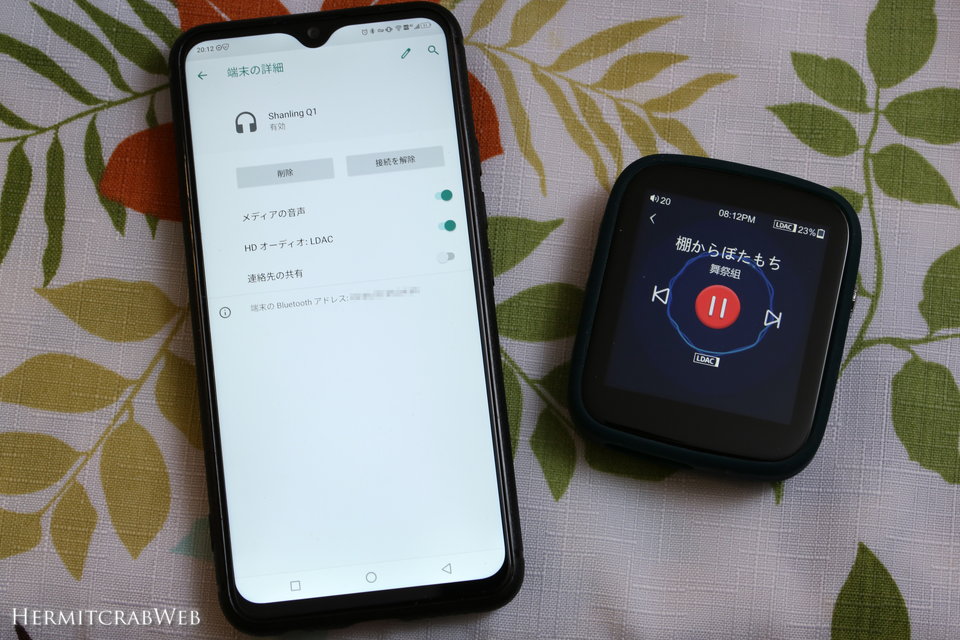
前後しますがBluetoothレシーバーをまず試してみます。特に難しいことはなく、Q1とスマホをBluetooth接続するだけ。スマホ画面とQ1に表示されているとおり、LDAC接続できています。

 https://ja.wikipedia.org/wiki/LDAC
LDACはSONYが開発したBluetoothコーデックで、最大24bit96kHzに対応する高音質コーデックですが、Android8から標準機能になったそうです。AS06やC12などの高音質有線イヤホンをBluetooth接続できるようになり、運用の幅は広がりそうですね。
Q1 AS USB DAC/AMP
Q1 can be used with computers and chosen Android devices as USB DAC/AMP (External soundcard).
To use Q1 in USB DAC/AMP mode, be sure USB Mode is set to “DAC”.
Note 1: With Linux and MacOS systems, Q1 doesn’t need any drivers installed. Simply connect Q1 to computer with provided USB cable and set it as main output device in sound settings of computer.
Note 2: Compatibility with Android devices depends on Android device used, version of Android, used software, internal settings of Android and on used cable.
Using Q1 with Windows
1. Download dedicated Q1 USB drivers from Shanling website
2. Unzip downloaded files and start installation by clicking on “Setup.exe” file. Follow displayed instructions. Have your Q1 and provided USB cable ready.
3. If drivers were installed correctly, screen of Q1 will show icon of USB connector and Q1 will be displayed in Sound control panel of your computer as “Shanling audio device”. Set it as “Default device” to finish set up.
4. To turn off USB DAC/AMP mode, tap on “Back” icon.
Shanling Q1 – Advanced User Manual Fw V1.2.pdf from http://en.shanling.com/download/68
USB DACをセットアップしてみます。MacやLinuxではドライバ不要で機能するようですが、Windowsはドライバを入れなければなりません。ちなみにAndroid機でも機能するようですが、小生は両端がType-CのUSBケーブルを持っていないので試せません。まあそれこそ上述のケーブル一体型小型USB DACがあるので、Q1をスマホに接続することは無いと思いますw
Shanling公式サイトからドライバをダウンロードしPCにインストール→Q1のUSBモードをDACに変更しPCに接続→サウンドの設定でShanling Audio Deviceを選択すればOK(自動で選択されてるかも)。ビットレートは最大32bit192kHzまで表示されてますが、Q1はUSB DACモードでは最大24bit192kHzまでの対応です。

